Produktbeurteilungen: neuer Kindle Paperwhite

Im Laufe der Jahre habe ich mir immer einige Zeit nach Markteinführung den neuesten Kindle gekauft und ich benutze sie alle noch:

Der Vorteil ist, dass es sehr komfortabel ist, mit mehreren  Kindles parallel zu arbeiten:

  • den

    alten Kindle verwende ich jetzt nur noch zum Lesen von deutschsprachigen Texten, die keine Bilder oder Zeichnungen haben.( vor allem Belletristik ).Da er sehr klein ist, kann ich ihn immer dabei haben und wenn ich irgendwo warten oder im Stau stehen muss, habe ich  immer was Interessantes zum Lesen dabei.

  • den

    älteren Kindle White verwende ich für fremdsprachige Texte, in denen ich ab und zu einmal eine Stelle lesen möchte  und eventuell auch einmal ein Wort im Wörterbuch nachschlagen muss.  Das ist mit dem alten Kindle sehr umständich.

  • den

    neuesten Kindle White  verwende ich für Texte, die ich gerade durcharbeite, da er einige deutliche Vorteile gegenüber dem alten Kindle White hat ( siehe unten), die das Lesen erleichtern und damit die Augen schonen, was für mich als Brillenträger wichtig ist.

  • den

    Kindle fire verwende ich, wenn in  Dokumenten  Zeichnungen oder Bilder enthalten sind und für pdf-Dokumente. DIN A4 Dokumente lassen sich gut lesen, wenn der Kindle fire in Landschaftsansicht gehalten wird. Besser wäre ein noch größerer Bildschirm, aber dann werde ich mir wohl gleich einen Tablet-Computer mit 11″ kaufen.

Verbesserungen des neuen Kindle White gegenüber dem alten Kindle White:

Bessere Lesbarkeit der Texte:

  • höhere Bildschirmauflösung
  • neuer Schrifttyp erleichtert das Lesen und das unschöne Unterschneiden von Buchstaben tritt nicht mehr auf.
  • mit der automatischen Worttrennungsoftware wird der Text jetzt im Blocksatz auf den Bildschirm angepasst. Damit sehen Texte wesentlich besser aus.

verbesserte Zugrifffsmöglichkeiten auf  den Text

  • Notizen können auf den PC exportiert werden.
  • mit der  PageFlip-Funktion kann durch den Text geblättert werden, ohne die Seite zu verlieren, die man gerade liest. Ist insbesondere  angenehm, wenn man noch einmal eine Stelle ein paar Seiten vorher lesen möchte.

Meine Kaufentscheidung:

  • die wichtigsten Gründe für den Kauf waren:
    • verbesserte Lesbarkeit
    • verbesserte Formatierung im Blocksatz
  • 3G habe ich nicht gewählt, WLAN reicht mir völlig. Heute hat fast jedes Hotel eine WLAN – Verbindung und zu Hause habe ich ebenfalls eine. Der Mehrpeis lohnt sich also nicht.
  • Ich habe die Version mit Spezialangeboten gewählt, weil die mich nicht stören und der Kindle deutlich billiger ist.
  • natürlich habe ich die schwarze Lederschutzhülle gekauft. Der Schutz ist notwendig und es ist auch sehr bequem, dass der Reader mit Öffnen der Schutzhülle gestartet und mit Schließen ausgeschaltet wird. Ist beim Fire noch recht umständlich.
  • als Ladegerät verwende ich seit langem das AmazonPowerFast Ladegerät. Das Aufladen geht damit schneller als über den USB-Anschluss an den PC oder mit dem Amazon USB-Ladegerät, das ich auch habe, damit ich es auf Reisen  dabei habe. Oft vergißt man, solche  Kleinigkeiten für eine Reise einzupacken und insbesondere  der Kindle fire kann mit einer Akkuladung nur ca. 8 Stunden genutzt werden.

Preis für den Kindle paperwhite mit Lederhülle und WLAN

150, – euro

  ( mit kostenlosem Versand für Prime-Mitglieder )


Veröffentlicht unter Produkte | Verschlagwortet mit , , , | Hinterlasse einen Kommentar

Essayists: Michel Montaigne

I  like to read essays, when they are well written. Not too many words, if they are not really needed.

Essays demonstrate the thinking process of the writer and oftenly they are even much better than texts from some philosophers.

What else  can we learn from reading essays ?

  • that depends on the writer: Michel Montaigne writes much about his daily problems, Samuel Pepys about his daily political work. By the way, Pepys was famous to have a large personal library of 3000 books. Nowadays  we all can create our own personal library with much more eBooks, if we like.
  • others refine their essays, until they get some piece of art, like for instance Kleist in his essay On the Marionette Theater

The  variety of topics, styles and  personalities of the essay writers makes it an enjoyable experience, to read essays and doing this, we do an excellent workout for our brain.

If one masters a foreign language, it is of course even more fun, to read the essays in the natural language of the writers. And with the Kindle Readers, especially the Kindle White, it is quite comfortable.

If one does not understand a foreign word, one can mark it with a click and an integrated dictionary will open. The unknown word is even stored on a flashcard for later repetition. But up to now not a repetition algorithm according to Leitner is integrated.

Besides reading essays it is also an excellent training, to write ones own essays. Some people like to write diaries, but I find it more motivating, to write essays. This helps to understand a topic much better, than only reading about it.

Montaigne is in general considered to be the first essayist. But that is only valid, if one puts the form of an essay into  quite narrow limits. Since people mastered to write texts, they also have written texts, which are similar to an essay.

I think, that Dschuang Dsi also wrote essays;  he tried to clarify a problem, by writing about it and using different approaches, to clarify the problem and eventually find a solution.

More important than the form of a text  is  its  content.

Should one read all essays of a writer in one go ?

I prefer, to read texts from many writers parallel. Not only essays, but also some belletristik, pieces of classical literature or philosophical texts etc.  And using the Amazon eBook-Readers, it is easy, to come back after several weeks to a  book and go on reading it, because the position is marked, where one stopped to read.

I find that more enjoyable, than reading thick books in one go. There are some exceptions of course, if a book is very fascinating.

Montaigne has written many essays and the best approach may be, to browse all of them and just read those, in which one is most interested. One must not read all of them.

His essays are published in English  at the online library  Project Gutenberg.

In French or as translations in other languages, they are also available of course.

One should pay attention, if really all essays are published in a translation. I dislike, if somebody decides, what is worth to read. I want to decide that myself and not get misled by the filtered view of somebody. That is also an important reason, to read religious or philosophical  texts in their natural language, if possible.

Veröffentlicht unter Große Denker der Menschheit, Schreiben | Verschlagwortet mit , , | Hinterlasse einen Kommentar

Information networks: applied to multidimensional cubes part 7a

I have found a simpler solution, but not as simple, as I hoped.

I had hoped, that it would be possible, to find some pattern, how  the number of squares depend on the dimenions of the cube.

The problem is, that there are too few cases, to find a pattern. We can only use following sequence:

  • one point
  • one segment with length 1
  • one square, which side length is 1
  • one cube, which edges have  the length 1

At dimension 2  there is 1 square  ( 4 corners )

At dimension 3  there are 6 squares ( 8 corners )

That is not enough information, to derive an equation for the number of squares, depending on the dimension or the number of corners.

Therefore we have to do some other calculations:

  • we know, that each square has 2 diagonals, each 1.414 long.
  • therefore we just calculate for each cube the number of diagonals of length 1.414 and divide it by 2. That must give us the number of squares for each cube of n dimensions.

We know the number of corners and the coordinates for each cube of dimension n.

  • with that information we calculate the distances between all points and will find:
    • number of edges
    • number of diagonals in squares
    • number of diagonals in cubes of dimension n and in less dimensions ( Hypercubes )

The calculations are quite easy, but there are needed many of them.

Example for a cube of dimension 4:

distance between P11(1,0,1,1) and P9(1,1,0,1) is

Squareroot ( 1+1+1 ) = 1.73,

which is  a diagonal in a 3 dimensional  Hypercube. ( Hypercubes are all cubes, which have a lower dimension than the space, in which they are embedded.

We will create a table, in which all points are in the first row and the first column and then we calculate the distances between them. ( only for the triangular list  above the diagonal ). There are needed  (16*16-16)/2 = 16(16-1)/2 = 8*15 = 120 calculations, what is still manually manageable.

That is a good opportunity, to use the spreadsheet calculation in StarOffice:

  • in the cells of the first row and first column   Point 0 to point 15 is ( P0 to P15 ) written.
  • in the cells of the second row and the second column, the coordinates of these points are written.
  • in the cells above the diagonal all distances between the 16 points are written.

Here is  some part of the spreadsheet, to demonstrate, how the table looks like. The calculations  themselves are easy, mistakes can happen, which we will find out, when the table is complete, because then we will see some patterns, which are interrupted, when we made a mistake.

SpreadsheetCube4

Veröffentlicht unter information networks | Verschlagwortet mit , | Hinterlasse einen Kommentar

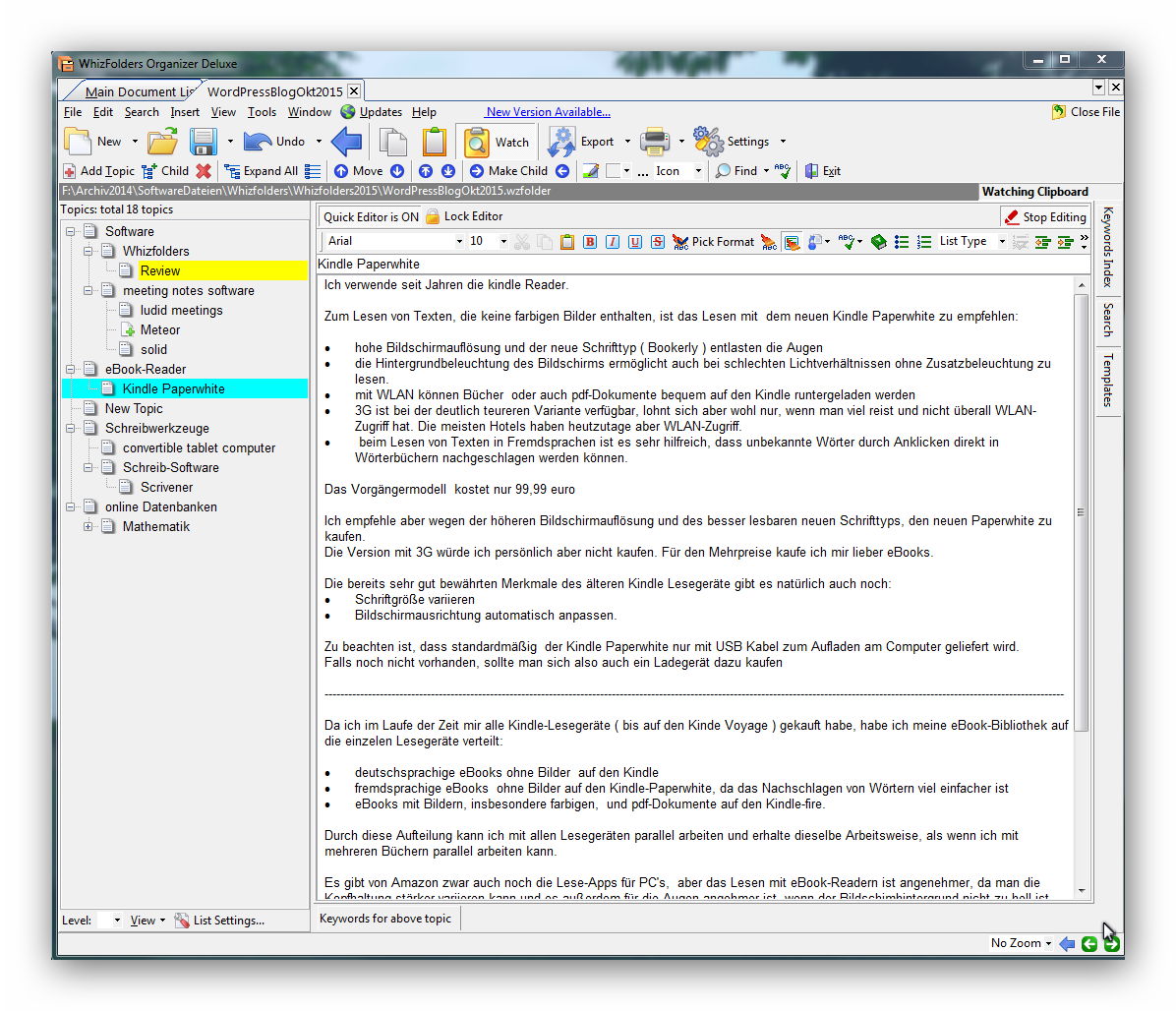
Software: Textgliederungen mit Whizfolders erstellen

Whizfolders verwende ich  seit über 10 Jahren. Es ist ein sehr nützliches und zuverlässiges Softwareprogramm, das ich zum Schreiben von Textentwürfen, aber auch als Adressverwaltungsprogramm verwende.

  • Die  aktuelle Whizfolders Deluxe Edition ist 6.6.4 und kostet 50 US-Dollar.
  • Es gibt auch eine kostenlose und eine  Whizfolders Profi Edition für 25 US-Dollar.

Whizfolders war ursprünglich ein reines Gliederungsprogramm, mit einer 2 – Fenster Ansicht. Links die Gliederungsansicht und in der Mitte  der rich-text Editor.Whizfolders


Funktionen von Whizfolders:

Im Laufe der Jahre wurden immer mehr nützliche Funktionen hinzugefügt,wie:

  • Hyerlinks in der Gliederungs- und in der Editoransicht
  • paralleles Arbeiten mit 2 Editoren möglich ( Quick- und Advanced Editor )
  • Text oder Bilder, die mit copy in das Clipboard kopiert werden, können automatisch in das Editorfenster eingefügt werden. Das ist sehr komfortabel, um sich wichtige Textstellen aus einem Textdokument zusammenzustellen.
  • Gliederungen von anderen Programmen und Excel-Tabellen können importiert werden.
  • Texte können ins rtf- oder ins html – Format exportiert werden ( Bilder werden aber nicht exportiert )
  • es können eBooks in einem eigenen Whizfolders-Format erstellt werden.
  • Texte können verschlüsselt werden; zwar kein starker Schutz gegen Spionagedienste, aber für Normalbürger  wohl  ausreichend, die ihre  Texte vor neugierigen Blicken schützen wollen.

Anwendungen

  • natürlich hervorragend geeignet zum Erstellen von Textgliederungen
  • der Rohtext für Bücher kann damit sehr gut geschrieben werden. Die endgültige Formatierung muß dann aber in einem anderen Softwareprogramm erfolgen:
    • eBooks für die Kindle-Lesegeräte mit dem Jutoh-Editor
    • für print on demand Bücher mit StarOffice zum Beispiel; damit kann der Rohtext formatiert und als pdf-file gespeichert werden, so dass das Buch auf Amazon veröffentlicht werden kann.

Arbeitsfluss beim Schreiben

von umfangreicheren Texten gestaltet werden kann:

  • Planung  und Schreiben des gesamten Rohtextes  mit Mindmaps ( mit Freeplane )
  • oder:  Planung und Schreiben des gesamten Rohtextes mit Whizfolders

und danachFormatierung mit dem Jutoh-Editor oder mit  StarOffice

oder:

  • Planung und Schreiben des Rohtextes mit Scrivener und danach Formatierung mit StarOffice

Und es gibt auch Mischformen:

  • ich plane den Text mit Mindmaps und füge Stichpunkte in die Notizfenster ein, damit ich mit Hilfe der Stichwörter  den Rohtext anschließend  in Whizfolders mit Dragon Naturally Speaking diktieren kann. Dabei verwende ich noch keine Formatierungen, denn die Formatierung geht bei dem Export ins  txt-Format ohnehin wieder verloren.
  • den Rohtext, der im txt-Format abgespeichert wurde,  formatiere ich mit dem Jutoh-Editor für eBooks und mit StarOffice für print on demand  Bücher.

Ich habe versucht, auch mit Scrivener zu arbeiten, konnte aber bisher noch keine Vorteile erkennen und wende es deshalb wahrscheinlich nicht verwenden und  weiterhin  meinen erprobten Arbeitsfluss anwenden.  Aber jeder muß wohl selbst ausprobieren, was ihm am besten liegt.

Noch eine kurze Bemerkung zu Dragon Naturally Speaking Home :

Diese Version kostet für Prime-Mitglieder ca. 78,- euro und reicht für das Diktieren eigentlich völlig aus. Die Profiversionen kosten fast das doppelte.

Obwohl ich eine recht tiefe Stimme habe, hat die Software eine sehr hohe Erkennungsrate.

Die Software kann schneller den diktierten Text in Schrift umsetzen, als ich normalerweise spreche.

Wenn der zu diktierende Text durch Stichwortlisten gut vorbereitet ist, ist es also leicht möglich, 10 DinA 4 Seiten Text pro Stunde bis  zu ca.20 Din A 4 Seiten zu diktieren. Die Begrenzung wird durch das Konzentrationsvermögen gesetzt.

Beim Diktieren des Rohtextes sollten grundsätzlich keine Korrkekturen und keine Formatierungen durchgeführt werden. Das stört nur den Arbeitsfluss.

Liegt die erste Version des Rohtextes vor, kann man anfangen, ihn zu bearbeiten:

  • soviel wie möglich kürzen. Die meisten Texte sind zu lang ohne dass sie mehr wertvolle Informationen enthalten.
  • prüfen, ob die Textstruktur logisch ist und ob die Formulierungen gut sind.
  • erst, wenn der Rohtext inhaltlich fertig ist, anfangen, ihn auf Grammatikfehler und Schreibfehler  prüfen.
  • Die endgültige, mehrfache Überprüfung sollte erfolgen, wenn der Rohtext in die oben erwähnten Textprogramme exportiert und dort formatiert wurde. Dann fallen viele Fehler noch besser auf.

Mehr Details zu der empfohlenen Arbeitsweise haben wir in unserem eBook  Vom Sachbuch zum Wissenstransfer – eBook beschrieben.

Veröffentlicht unter Softwarebesprechung | Verschlagwortet mit , , , , | 2 Kommentare

Mathematische Hilfsmittel

Manchmal arbeiten wir noch mit Abakus, Rechenschieber und Logarithmentafel, weil wir uns auch für alle älteren Rechenhilfsmittel interessieren, es aber manchmal auch Probleme gibt, die sich mit diesen Hilfsmitteln durchaus gut lösen lassen.

Für Abschätzungen und um Kontroll-Beispiele zu erhalten, verwenden wir:

Für umfangreichere oder sehr schwierige Berechnungen verwenden wir:

Es gibt eine Vielzahl von mathematischen Softwareprogrammen, die aber oft auf einen speziellen Anwendungsbereich  spezialisiert sind.

Aber mit den oben genannten Hilfsmitteln lassen sich bereits sehr viele Berechnungen durchführen.

Im allgemeinen ist es sinnvoll, immer mit den einfachsten Beispielen zu beginnen  und sich dann schrittweise zu den schwierigeren Aufgabenstellungen durchzuarbeiten. Dann hat man   immer ein  Beispiel, mit dem  ein Computerprogramm überprüft werden  kann und es ist einfacher,  sich  in eine neue Problemstellung einzuarbeiten.

Auch ein Computerprogramm sollte  schrittweise entwickelt werden, damit immer eine lauffähige Version existiert, die man wieder verwenden kann, falls bei Änderungen im Programm Fehler auftreten, die nicht behoben werden können.

Nichts ist frustierender, als ein Computerprogramm, das überhaupt nicht mehr läuft und nur noch eine Vielzahl von Fehlercodes ausgibt.


Programmierbare Taschenrechner von Hewlett Packard

Ein programmierbarer Taschenrechner ermöglicht bereits  recht  schwierige Berechnungen. Er sollte also nicht unterschätzt werden. Der Programmieraufwand ist relativ gering, da auf einen großen Vorrat an programmierten Funktionen zugegriffen werden kann.

Für kurze Programme ist der  HP35s gut geeignet, aber die Programme können nicht extern gespeichert werden, was nicht stört, wenn man nur einmalige ad hoc Berechnungen durchführt.

Für längere Programme sollte aber  der HP50g verwendet werden, da damit die Programme auf einer Speicherkarte gespeichert werden können.  (  Es gibt aber noch einige weitere Merkmale, die diesen Taschenrechner auszeichnen. )

Der HP50g  kann in der sehr mächtigen Programmiersprache RPL ( RPL = Reverse Polish Lisp )  programmiert werden, für die es von HP ein kostenloses, sehr umfangreiches Handbuch gibt.

Ich hoffe, dass Hewlett Packard einmal ein Nachfolgemodell auf den Markt bringt, das alle Möglichkeiten des HP50g beibehält,  aber   mit wesentlich größeren,  farbigen  Bildschirm ausgestattet ist, der auch als Digitalisiertablett  verwendet werde kann. Also ein richtiges Rechenmonster.

Das wäre dann kein Taschenrechner mehr, sondern ein Tablet-Rechner.

Der Bildschirm sollte mindestens 11 Zoll groß sein und es sollten sehr viele Hard- und Softwaretasten zur Verfügung stehen, so dass man mit nachtwandlerischer Sicherheit alle Möglichkeiten des Rechners nutzen kann und durch  plug and drop  ein Softwareprogramm erstellen kann.

Bevor ein Programm erstellt wird, sollten erst  Beispiele durchgerechnet werden, mit denen später das Programm getestet werden kann.

Tabellenkalkulations-Programme

Tabellenkalkulations – Programme eignen sich gut für numerische Berechnungen, wenn nur die Grundrechenarten und die üblichen mathematischen Basisfunktionen benötigt werden.

Werden aber sehr viele Iterationsschritte benötigt und müssen numerische Rechenfehler kontrolliert werden, benötigt man fortgeschrittene Programme, wie Mathematica oder einen Fortrancompiler.

Da Tabellenkalkulations-Programme  in den meisten OfficeSuite Programmen enthalten sind und sie auch für viele Organisationsaufgaben genutzt werden können, lohnt es sich immer, sich in sie einzuarbeiten.

Programmiersprachen:

Außer Fortran  gibt  natürlich auch andere Programmiersprachen, wie C++ zum Beispiel. Aber der Simply  Fortrancompiler ist mit einem sehr guten Editor ausgestattet und kann mit einer recht umfangreichen mathematischen Bibliothek ergänzt werden und bei Bedarf ist es dann relativ leicht, Fortranprogramme auf  online- Hochleistungsrechnern laufen zu lassen. Das kann eine preiswertere Lösung sein, als sich selbst einen PC mit sehr viel RAM zu kaufen.

Also:  Programm schreiben und ausführlich testen und dann, falls die Rechenzeiten untragbar lang sind sich Rechenzeit auf einem online-Computer mieten.

Ab und zu werden wir an Beispielen zeigen, wie alle diese mathematischen Hilfsmittel wirkungsvoll  in den  Arbeitsfluss  eingesetzt werden können, wobei wir natürlich auch die Sackgassen beschreiben, in die wir vielleicht geraten sind. Probleme werden selten gelöst, ohne dass man ab und zu auch einmal in eine Sackgasse gerät oder Fehler macht.

Also, alle Fehler systematisch erkunden.  Was übrigbleibt, muss die richtige Lösung sein, falls überhaupt eine existiert  🙂

In zukünftigen Posts werden wir die verschiedenen Programme etwas genauer beschreiben und zeigen, wie damit Problemstellungen untersucht werden können.

Dabei beginnen wir immer mit den einfachsten Hilfsmitteln und verwenden schrittweise die mächtigeren, aber nur,  wenn sie wirklich benötigt werden.

Veröffentlicht unter Mathematik | Verschlagwortet mit , , , , , | Hinterlasse einen Kommentar

Software: Hypertexte mit dem HTML Editor KompoZer erstellen

Der Editor in WordPress, aber auch  viele andere rich-text-Editoren, stellen nicht immer alle die Möglichkeiten zur Verfügung, die für die Erstellung eines gut formatierten Textes benötigt werden.

In dem WordPress – Editor fehlen zum Beispiel die Formatierungsmöglichkeiten, Zahlen hochzustellen, um Flächen- oder Volumenangaben in der Standardform zu formatieren.

Auch das Einfügen von Tabellen fehlt.

Da der WordPresseditor neben der normalen Textansicht auch den HTML Code anzeigen kann ( oben  rechts im Editorfenster steht neben Visual  HTML ), ist es möglich, in den im  HTML Code angezeigten Text,  weiteren HTML Code einzufügen oder den vorhandenen zu ändern.

Es ist aber recht mühsam, längere Texte manuell mit HTML Code zu schreiben. Deshalb sind HTML Editoren sehr hilfreich.

Der HTML Editor KompoZer ist ein kostenloser, open source WYSIWYG –  Editor, der mehr Möglichkeiten als der WordPress-Editor bietet.

Vorgehensweise:

  • der gewünschte Text wird in dem Editor geschrieben, der html – Code kopiert und an der gewünschten Stelle in den html-Code des WordPress-Editors eingefügt.
  • umschalten auf Visual und prüfen, ob das gewünschte Ergebnis erreicht wurde, falls nicht,  Text im KompoZer Editor korrigieren.

Einige wichtige Merkmale:

  • sehr gutes Manual
  • die Größe von Tabellen und Zellen in ihnen können angepasst werden
  • es können parallel Dokumente in mehreren Windows bearbeitet werden
  • es können Hintergrundfarben verwendet werden
  • mit dem Editor kann auch der html-Code von Webseiten oder eBooks bearbeitet werden.
Veröffentlicht unter Schreiben, Softwarebesprechung | Verschlagwortet mit , | Hinterlasse einen Kommentar

Information networks: applied to multidemensional cubes part 7

In the following posts we will explain, how to appy the findings about networks, to analyze the structure of multidimensional cubes.

We investigate the multidimensional cubes in orthogonal, Euklidean spaces, that means:

  • the coordinate axes are orthogonal
  • in Euklidean spaces of any dimension, the theorem of Pythagoras is valid

We start with a square in the  2-dim  Euclidean space and then go on to higher dimensions.
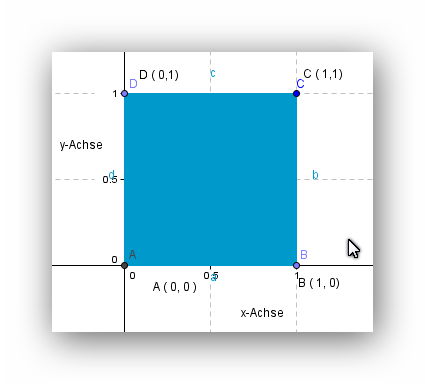
Einheitsfläche

We use following conventions:

  • the horizontal coordinate-axis is labelled as the x-axis
  • the vertical coordinate – axis is labelled the y-axis
  • both axis are orthogonal
  • the length of each side, is 1  m

From that it follows:

  1. dimension of Euclidean space = 2
  2. area of square = 1 m^2
  3. main diagonal  is AC   =  1.414  = BC

Now we imagine, that we are living in a two-dimensional world and that therefore we have no idea, how a cube in 3 dimensions will look like.

How can we find it out, by using only mathematical reasoning ?

At first we see, that we have to use 2 coordinate axes in 2 Dimensions and therefore  a 3. coordianate axis is needed, if we make calculations in 3-dimensional space.

Because  in 2 dimensional space we label each point with 2 figures, like P (  x,y ), we now have to label a point in 3 dimension as P ( x,y,z )

Because we cannot draw and construct a 3 dimensional cube, because we are living in a two-dimensional world, we can use only algebraic methods, because we also cannot visualize a cube in 3 dimensional space.

  • We know, that the x, y and z axis must be orthogonal, because  now, we have a 3 dimensional Euclidean space.
  • in 2  dimensions, we have a square with 4 corners. But how many corners will a 3 dimensional cube  have ? Because we cannot visualize a 3 dimensional cube, we don’t know it.

Therefore we have to check in detail, how we labelled the corner points of the square.

(0,0), (0,1), (1,0), (1,1)

Apparently, each coordinate of a point can have only the values 0 or 1 and all possible combinations of them  are used. Therefore we get 4 corner points.

We can go on one step further now, because the use of   o and 1 reminds us of the binary number system, like:

21 20 decimal number labels of
points
0 0 0
=  A
0 1 1
=   B
1 0 2
=   D
1 1 3
=   C

Now we can apply an elegant method, how to use number-labels for the corner points in a consistent way, which we can use also for multi dimensional cubes.

We transfer the binary numbers into decimal numbers

00  →  0

01   → 1

10  → 2

11   → 3

And we can use now these number labels, which will be much better for all calculations in multidimensional cubes:

A   → 0,      B   → 2,     C  → 3,       D   →1

To get a bit familiar with this kind of labelling, we calculate the distances  L   between these points.

L01 = 1     L02 = 1   L03=1.414    L12 = 1.414   L13 = 1  L23 = 1

We get the lengths of  the 4 edges and the 2 diagonals.

The main diagonal goes from point 0 to point  3

L03 and L12 are calculated, using the Theorem of Pyhthagoras in othogonal triangles.

Now we repeat all steps, but for a cube in 3 dimensional space.

  • because we have one additional  coordinate axis, we have to use 3 positions for the  binary numbers, to define each corner
  • each binary number we transfer again into a decimal number
22 21 20 number labels of
points
0 0 0 0
0 0 1 1
0 1 0 2
0 1 1 3
1 0 0 4
1 0 1 5
1 1 0 6
1 1 1 7

We remark following features:

  • if the 3. coordinate is 0, then we get the projection of the 3 dimensional cube onto the 2 dimensional plane. That means, that the points 0, 1, 2,3  are the corner points of the square
  • if the 3. coordinate is 1, then 4 new corners show up.
  • in total we get 8 corners, which is  just  2^3

We could now calculate again all distances between these points  and would find:

  • All edges have the length 1 m
  • all diagonals in square faces have the length 1.414 m
  • but we also get 4  new diagonals, which have the length 1.73 m

When we check, how we calculate these diagonals, we see, that the 3. dimension is included  in the Theorem of Pythagoras and that the lengths of these space diagonals is just the square root of the dimension of the cube.

Now we could calculate the lengths  of all paths, whichever we like.

As an example we only calculate the length  the path 01234567

L 07 = 1+1.414+1+1.73+1+1.414+1 = 8,56 m

  • Does there exist shorter paths, which use another sequence  of points, to come from point  0 to point 7, but which include  also each point only once ?

To summarize, what we found out :

  • each corner point  of  a  cube in  an  n-dimensional Euclidean space, is defined by a binary number with n positions
  • each corner can be labelled by using the decimal number, which is tranferred from the binary number representation of the corner coordinates
  • the lengths of the edges are always 1 m and are  independent from the dimension of the space.
    • The same is valid for the areas of the faces of the cube; each is 1 m^2
  • The volume is also always 1, but the unit for the volume is dependent on the dimension, like
    • area of square = 1 m^2
    • volume of 3 dimensional cube =  1 m^3
    • volume of 4 dimensional cube  = 1 m^4
    • volume  of n-dimensional cube = 1 m^n
  • the lengths of the diagonals are also dependent on the dimension of the space

To understand better the structure of such cubes, we must find answers to several questions, like for instance:

  • How many square faces do multidimensional cubes have ?

We know, that in 2 dimensions there is just 1 square face and in 3 dimensions there are 6 square faces. But these informations are not yet enough, to find any pattern, which correlates the number of square faces with the dimensions  of the cubes.

Because we cannot visualize cubes of higher dimensions than 3, we have to use again an algebraic approach.

We ask ourselves following:

  • what characterizes a square face ?

Answer:

  • each square face has 4 corners
  • the distance beween neighbour corners is 1
  • the diagonals have the lengths 1.414

But that does not yet help us, to answer the question, because there is still one problem:

  • how do we know, that 4 corners are neighbour corners and are in the same plane ?

Definition:  a plane in a multidimensional Euclidean space is defined by 3 different points on it.

One straigthforware  method, to investigate, if all 4 corner points are on the same plane is, to calculate the equation for the plane, which is defined by  3  corner points and then check, if also the 4. corner points is on this plane.

Because that needs quite some calculations, I  postpone it a bit, hoping, that my  brain works a bit during sleep and finds a clever solution for it, which could save us a lot of work.

At least I have the feeling, that there must exist a much simpler method.

Veröffentlicht unter information networks | Verschlagwortet mit , , | Hinterlasse einen Kommentar

Information networks: how to construct paths in incomplete networks part 6

Just some remarks about incomplete networks, which are very important, because in most applications we will face them.

Up to now we have focused on:

  • complete networks
  • complete networks without feedback loops
  • and have shortly mentioned also directed complete networks, which have no feedback loops and  in which each path runs only in the same direction, starting with the lower point number and ending at a higher point number

In applications we will face any kind of incomplete networks, in which some connections between points do not exist.

The general procedure to deal with any kind of   incomplete network is:

  • we start with a complete network of the same order as the incomplete network has
    • we calculate all paths in the complete network
    • we filter out all the paths, which fulfill all conditions of the incomplete network
  • we compare the incomplete with the complete network and calculate several key figures, with which we can characterize incomplete networks and compare them one with the other, but also with the complete network of the same order.

For incomplete  networks of low order we can do it manually, but in general we will need to use computer programs.

The general procedure,  to write a program is:

  • we calculate all subsets for the set with n points
  • we calculate all permutations for each of the subsets
  • we apply several    if-then-else  conditions, which specify, which paths we want to keep.

The details, how to do it, depend of course on the programming language.

  • in Lisp and similar languages ( like also Wolfram ) , we have to deal with lists and then apply the commands for lists, to filter out the wanted paths.
  • in Fortran and  similar languages, we have to use matrices, in which each row represents a path. We then check each row with the  if -then- else conditions, which we integrate in  do- loops.

For networks of very high order, probably to use Fortran might be better. If we want to analyze  information network structures in biology for instance, in which eventually billions of points define the network, then Fortran probably is the best choice, because for it very advanced compilers exist, which can do the calculations parallel on many computers.

We will discuss applications in future posts, using both languages.

But before we leave the ideal world of abstract information networks, we want to consider as a geometric application  multidimensional cubes  🙂

Veröffentlicht unter information networks | Verschlagwortet mit , , , | Hinterlasse einen Kommentar

Information networks: how to construct paths part 5

Here we show, how paths from order 3 to order n  can be constructed in complete networks.

We use the Software program Mathematica for it.

We consider the numbers of the points in the network to be a mathematical set.

  • if the network has n points, then the set is  M= { 1,2,3, …  n }
  • each set has 2^n  sub sets, including the set itself and the void set.
  •  The set M  with 4 points M = {1,2,3,4} has then 16 subsets in total, but we are interested only in subsets, which have 3 or more elements, up to n elements, because a path needs to have minimal 3 points or more.

Step 1: 

In Mathematica we can use the function:

KSubsets[ {1,2,3,4},3]  and we get the 4 subsets:

  • {1,2,3}, {1,2,4},{1,3,4},{2,3,4}
  • and we have to add the set itself, because each set is a subset of itself

Because a set has only different elements, feedback loops are excluded automatically by this approach.

 Step 2:

In the second step we must calculate  for each subset all permutations, for which we use the function Permutations in Mathematica:

Permutations [1,2,3]

Permutations[1,2,4]

Permutations[1,3,4]

Permutations[2,3,4]

Permutations[1,2,3,4]

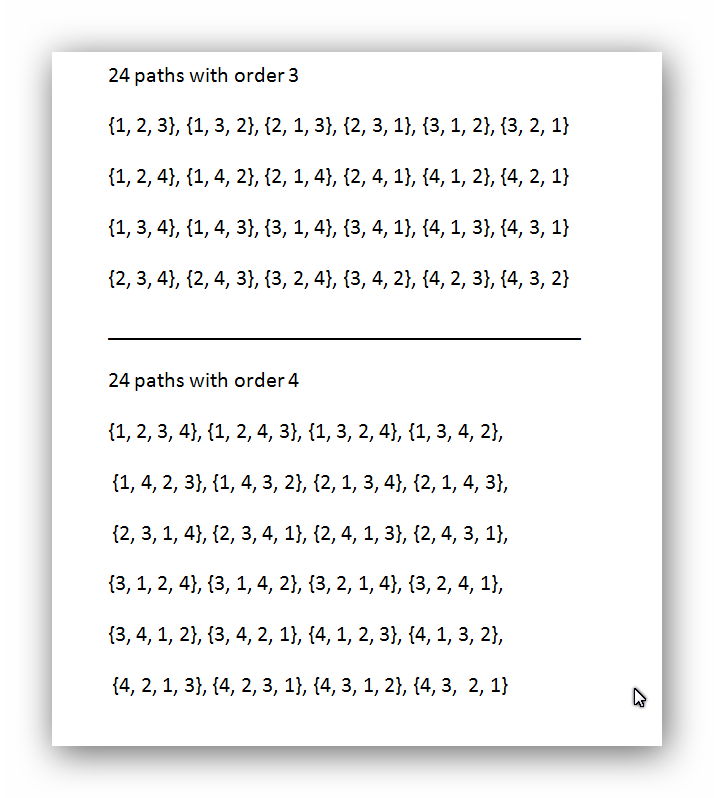
PathsOrder3Oder4

We check, if these results agree with our  earlier  calculations,  in the table below:

PathsOrder7

and see, that a complete network of order n=4   has 24 paths of order 3 and 24 paths of order 4

With the help of Mathematica it is no problem, to calculate the paths of almost any order. The limit is only the RAM of the used Computer.

Networks of order higher than about 7 and especially all the paths in them, can only be analyzed with the help of Computer-Softwareprograms.

But we must check of course, if the calculations are correct, using networks of lower order, which we still can analyze with manual calculations

Veröffentlicht unter information networks | Verschlagwortet mit , , , | Hinterlasse einen Kommentar

Information networks: paths in multidimensional cubes part 4

The following shall demonstrate, how powerful the concept of information networks is.

We apply this concept, to calculate the paths in multidimensional cubes.

People, who have not studied mathematics or physics, in general have no idea, what a space with 4 dimensions or even many more dimensions could be and how it is possible, that one can tell anything about them.

One astonishing fact we can tell directly:

  • After having studied information networks already in some detail, we know, that we can calculate, how many different paths of any order  exist in any multidimensional cube.

How is that possible, if we not yet have any idea, how such a multidimensional cube looks like ?

Simple !  We just ignore the dimensions.  They are irrelevant, if we are interested only  in the number of  paths.

  • The only number, which we have to know is, how many corners a multidimensional cube has and that we will calculate in some of the coming posts. And that is enough, to calculate  the number of  all paths from order 3 up to order n, which is the dimension  of the cube.
    • Thereafter we apply, what we have found out about paths in information networks.
  • if we also want, to construct the paths, then we have to do some more work.
    • we must find a clever way, how to label all corners of a cube, which is easy for a 3-dim cube, but not intuitively clear, how to do it with multidimensional cubes, because we cannot visualize them. And that is, because during the evolution of our brain, men never lived  in multidimensional spaces and therefore no brainstructures do deal with them, has been developed.

But we can overcome that problem, by using mathematical reasoning. Of course, even with that, we cannot visualize multidimensional cubes. It is similar to optical illusions; even if we know, that it is an illusion, we cannot avoid to get misled by it, because we have the wrong structure in  the system of our senses, nerves and in the brain.

Example:

A  cube in 3 dimensions has 8 corners, which is easy for us to visualize.

We directly can answer, how many different paths are possible, which include each of these corners, that means, we ask, how many paths of order 8 exist:

number of paths =  8! / ( 8-8)! = 8!/1  =  8!  =  1*2*3*4*5*6*7*8  = 40 320

Of course, probably  nobody really would be able  to construct all these paths  manually, but it is no problem, to do it, using a  mathematical  software program like Mathematica and we will show it for paths of lower order, like for paths of order 3, for which there exist

8!/(8-3)! = 8!/5! = 6*7*8 = 386  different paths.

We will develop the concept of information networks step by step further  in the next blog posts and also use multidimensional cubes  to demonstrate that concept.

Veröffentlicht unter information networks | Verschlagwortet mit | Hinterlasse einen Kommentar