Produkte: Fire TV Stick von Amazon

Produkt:

Der Fire TV Stick ist etwa so groß wie ein größerer USB Stick, mit Anschlusskabel für den USB-Eingang des Fernsehers und einem Netzkabel zu dem eigenen Netzteil.

Er hat 1 Gigabyte Speicher, in dem die runtergeladenen Fernsehprogramme zwischengespeichert werden. Das reicht nicht für einen kompletten Film, so dass zwischendurch einmal nachgeladen wird. Was aber recht schnell geht und deshalb wenig stört.

Der Fire TV Stick hat eine eigene Bedienung, die in Kombination mit der Bedienung des Fernsehers funktioniert.

Die Fernsehbedienung kann aber anscheinend auch die Funktionen des Fire TV Sticks aktivieren. Das muß man selbst ausprobieren.

Die Installation erfolgt problemlos und schnell.

Anwendungen:

  • Mit dem Fire TV Stick können kostenlose und kostenpflichtige Filme, Videos und Musik auf dem Fernseher gesehen oder gehört werden.
  • Es können auch kostenlose Apps heruntergeladen werden, so dass Fernsehprogramme von ARD, dem Zweiten Programm oder anderen Fernsehsendern gesehen werden können.
  • Besonders angenehm ist, dass man Fernsehprogramme sehen kann, die zu einem früheren Zeitpunkt gesendet wurden und die, soweit ich das bisher feststellen kann, ohne Werbung gezeigt werden.

Gründe für meine Kaufentscheidung:

  • Ich kann mir oft nicht die Fernsehprogramme, die mich interessieren, zu dem Zeitpunkt ansehen, wenn sie gesendet werden.
  • Ausserdem ist es viel angenehmer, zu einem vorgewählten Zeitpunkt genau das Fernsehprogramm oder den Film anzusehen, die man sehen möchte.
  • kein Zeitverlust mehr wegen störender Reklame  oder Rumzippen, um ein besseres Programm zu finden.
  • Ich habe mir erst einmal den preiswertesten Fire TV Stick gkauft, um Erfahrungen damit zu sammeln und in Ruhe abzuwarten, bis Amazon Folgeprodukte mit noch wesentlich mehr Möglichkeiten anbietet.

Insgesamt bin ich mit der Kaufentscheidung sehr zufrieden, da alles problemlos ablief und ich jetzt gezielter planen kann, wann ich mir ein Programm auf dem Fernseher ansehen will. Das geht jetzt viel bequemer, als wenn ich ein Programm selber aufzeichne.


Eine Warnung:

Aufpassen, wenn man kostenpflichtige Filme sich ansieht. Das kann im Laufe eines Monats  schnell einen größeren Geldbetrag ergeben.

Apps

Mit Hilfe von Apps, die installiert werden können, ist es möglich, Fernseh- und Radiosender zu installieren, Youtube und TED etc. oder Bildfolgen von der Erde oder Aquarien zum Beispiel.

Im Hauptmenü kann oberhalb des Startbuttons eine Ansicht des Alphabets aktiviert werden, mit deren Hilfe es möglich ist, nach Sendern usw. zu suchen.

Bisher habe ich mir neben den wichtigsten deutschen Fernsehsendern BBC, TED und Youtube installiert.

Veröffentlicht unter Produkte | Verschlagwortet mit | Hinterlasse einen Kommentar

Wordviews: Upanishads part 1

The religious belief, as it is described in the old religious scriptures  of India,  in the so called Vedanta and especially  the parts  of them, which are called the Upanishads, is really astonishing and worth, to be studied carefully.

The citations, which are used here are but not from the Upanishads themselves, but from a later work, which is based on the Upanishads.

Srimad Bhagavatam, the wisdom of God

translated from Sanskrit by Swami Prabhavananda

published in India 2008

ISBN 81-7823-315-0


I use the Srimad Bhagavatam, because it is kind of a commentary of the Upanishads and  easier to understand.  It can be bought at Amazon  as an eBook for the Kindle Readers (2,90 euro)

The master Maitreya explains to Vidura ( chapter 1 )

  1. The creation, preservation, and dissolution of the universe are all divine play.
  2. In the universe, the Self, who is the Self of all beings, appears as many.
  3. Before creation, and in dissolution, the world exists as one absolute existence, which is God.
    1. Then there is neither the seer nor the seen, neither subject nor object.
    2. There exists only consciousness itself.
    3. In that consciousness, which is absolute God, is the power, which divides itself into the seer and the seen, in the cause and the effect.
    4. This power is called Maya

Conclusions:

  • In 1, the reason is given, why the Universe was created  etc:    Divine Play
  • In 2  is explained, that all, what exists in the Universe is the Self
  • In 3 the state before the creation of the Universe is defined to be God.
    • 3A   explains a bit more, what qualities God has.
    • 3B   states, that there is nothing besides consciousness, which is God
    • 3C   explains, that God has the power, to divide himself and by doing so, he creates the universe.
    • 3D  defines this power of God  as Maya

 In the sequence of time, we have therefore:

God –> Maya of God –> Self

Question is now, what is  the difference between God and Self  ?

Maytreya explains a bit more about the creation in Chapter II of Book Three:

  1. Creation , O Vidura has no absolute beginning.
    1. The present universe is but one of a series  of worlds that are past and of worlds, that are to be.
  2. The cosmic energy alternates between periods of potentiality and of expression.
    1. The phase of potentiality is known as dissolution; the phase of expression is known as creation.
      1. Created things are of different kinds:
        1. The Avyakta, or cosmic energy, consists of three Gunas.
          1. When the equilibrium of the Gunas is disturbed, there are manifested universal intelligence, universal ego, the mind, the senses and the organs of sense, the subtle principle of elements, and the elements themselves.
          2. As these combine and recombine in various ways, all beings attain to existence.
  3. All things, whatsoever, O Vidura, were created by Brahma.
    1. While the world was yet submerged beneath the ocean, God lay brooding on Ananta, king of serpents, as Ananta floated upon the waters.
    2. God was resting, with eyes closed, but his consciousness was fully awake. He was completey merged in the bliss of his own Self.
    3. appearance of Brahma: After Brahma came out of God, God spoke to him: O Brahma, I command thee: again create the world, as thou hast often done in times past. To create is not new to thee. Whatsoever is to be created is aleady within me, as thou knowest. Creation is only the projection info form of that, which already exists.
  4. creation of mankind: While Brahma was meditating about the course he should pursue, his own form divided itself; one half became man and the other half became woman.
    1. The man was called Manu, and the woman Satarupa; and from them have sprung all mankind.

Conclusions:

  • From 1 it follows that there exists a sequence of  universes ( Universe = world, seem to be equal).
  • From 2 it follows, that there exists a cosmic energy, which can be transformed into objects, which all are combinations of elements.
  • In 3 it is explained, that Krishna  commanded Brahma, to create a new universe and all, what Brahma will create, is  a projection of what is already in Krishna.
  • In 4 it is described, that the first man and the first woman were created by Brahma, by dividing his own form.

Some general conclusions:

  1. There eixists only one God, called Krishna, who has no beginning.
  2. There exists no absolute beginning of the universe, but a sequence of many.
  3. All universes have been created by  Brahma, who is always in Krishna, before a new universe is created. The universe is the projection of what already is in Krishna.
  4. Mankind was created by Brahma, by dividing his form.

If we compare that with the reasoning of Christian theologians or with western philosophers, we see following:

  • western thinking always concludes, that because of the law of causality, there must be a first cause ( prima causa ), which is defined to be God.
  • In the Upanishads, this reasoning is not used. There does not exist a beginning of the universe. There exists a cosmic energy which gets tranformed into a universe, which gets transformed again into cosmic energy and so on.
  • Krishna exists outside of the universe, Brahma is engaged in the creation of the universe, which is a projection of what is already in Krishna. It is similar like a blue print, which has been made by Krishna and according to which Brahma manufactures the universe.

I want to stress, that it is a much more satisfying explanation, that the first man and the first woman are on equal footing and that both were created at the same time, because Brahma divided his form, than what is told in the Genesis in the Old Testimony.

From that it follows, that women are considered with much higher respect, than what we find in the 3 religions, which are based on the God Jahwe of Abraham.

Veröffentlicht unter Uncategorized, worldviews | Verschlagwortet mit , , , | Hinterlasse einen Kommentar

Software: visual, associative database TheBrain

TheBrain is a software, with which  visual, associative databases can be created.

And therefore it is the ideal piece of software, to store all kind of informations, cross-link them or link them with documents on the PC or with websites in the internet.

I use this software for more than 10 years now.

Some features of TheBrain

It is well documented with tutorials and help files:

  • one can use the basic features after 30 minutes training and start, to create a a very useful database.
    • the advanced features can be investigated step by step. Just browse the documentation, to get an overview, what is available.
    • there are offered webinars each week
  • one can create as many databases as one wishes
    • but if it makes sense, one should put all informations into only one database, to use the full power of the associative information network, which this database will represent
  • software runs very robust, but one nevertheless should save it oftenly enough and also synchronize it with the cloud. ( only possbible with TheBrain Pro Combo version )
  • one can use the software also to prepare a mindmap, but that is not really its core application.
  • every word in the database is indexed automatically, so that one will find any facts in it.
  • the number of facts, which can be stored in the database is limited only by the computer system, which is used.
  • there are several versions available at www.thebrain.com
    • a free trial version
    • a version for personal use only,  with  fewer functions, but free of charge. This is already very powerful and I recommend, to start with it.
    • The most powerful version is TheBrain Pro Combo, which costs 299,-  US-Dollar.  It is worth the money for all, who work with a lot of informations.
      • I also find it very comfortable, that one can store the database in the cloud and synchronize it with the database on the PC.

Personal applications:

I have created several data-bases with TheBrain:

  • for business applications
  • for private purposes
  • for eBooks, for which I search informations

It would be possible, to merge them all in one database, but because there are not really needed cross links between them, I  prefer, to keep them separately.

Other applications:

  • It is  possible to create databases for team work and store them in the cloud
  • databases can also  be  added  to a website

example

  • Politik


Veröffentlicht unter Uncategorized | Verschlagwortet mit | Hinterlasse einen Kommentar

Worldviews: Why do we believe something, which cannot be proved ?

Worldviews like religions and ideologies, but also atheism and superstition cannot be proved in a scientific manner, but at least superstition and and ideologies can get disproved.

It is quite easy for instance to prove, that Astrology tells nonsense. We only have to give the same data about a person or an event to several Astrologists and we will see, that we will get quite diffuse and wrong answers. But believers in astrology are not interested, to find out the truth about astrology.

The same attitude we find at  believers in ideologies. They are not prepared, to take into account the facts, which disprove their ideologies.

Even worse it gets with pure superstitions.

Apparently many people are prepared to believe in something, which cannot be proved to be true or they even go on to believe in it, if it can get disproved.

Question therefore is, why many people prefer to believe and are not willing to be sceptical and investigate, if a worldview tells them pure nonsensce  like the Scientology Church for instance, which has nothig to do with a religion and even less with science. It is just an invention of the Science Fiction Author  Ron Hubbard, who wanted to avoid  to pay taxes.

Ideologies have quite a simple worldview and they always find a minority, which they can accuse, to cause all problems in a society:

  • communist ideologies claim, that the capitalists cause all problems. But we have seen, that these ideologies only  establish  a  class of communist functionaries, which suppress  the majority, exploits them, tortures and murders them. And in general, many functionaries also get murdered.
  • the opposite ideolgies, like the fascistics, do the same. The only difference to the communists is, that the fascists focus onto their own nation. But they murder many of it.

Religions are much more difficulty to judge:

  • religions try to explain, what the sense of human life is and how the universe was created.

And because science cannot give an answer to these questions or disprove, what religions teach us, we must find out ourselves, how much we can trust religions.

  • It is a shame, that many religions fight against the others and are also responsible for many wars and that destroys the credibility of their organizations.

But I will not investigate these criminal actions of the organizations, but focus on the basic teachings of the founders of  the main religions:

  • what did the founders teach ( not what the later theologians taught, who always created very complicated teachings, because they wanted to solve contradictions between their religion and the world around them. )
  • did they prove by their own life, that they believed in their teachings
  • what is similar and what is different in the teachings of the main religions
  • what can science tell us nowadays about those religious questions

Before we start, to investigate those questions, we   try to find out, why we are prepared to believe in teachings, which cannot be proved scientifically, but also cannot  be disproved by science.

The depth psychologist  Carl Jung investigated myths, religions and fairy tales of many civilizations and came to following conclusions:

( citation from wikipdia )

Jungian views

  • The unconscious contains:
    • repressed experiences and other personal-level issues in its „upper“ layers
    • and „transpersonal“ (e.g. collective, non-I, archetypal) forces in its depths.
    • The semi-conscious contains or is, an aware pattern of personality, including everything in a spectrum from individual vanity to the personality of the workplace.
  • Archetypes are primordial elements of the Collective Unconscious in the psychology of Carl Gustav Jung.
    • Archetypes form the unchanging context from which the contents of cyclic and sequent changes derive their meanings.
    • Duration is the secret of action.
  • The psyche spontaneously generates mythico-religious symbolism or themes
    • and is therefore spiritual or metaphysical, as well as instinctive, in nature.
    • An implication of this is that the choice of whether to be a spiritual person may be beyond the individual
    • whether and how we apply it, including to nonspiritual aspirations.
  • All minds, all lives, are ultimately embedded in some sort of myth-making in the form of themes or patterns.
    • Mythology is therefore not a series of old explanations for natural events, but rather the richness and wonder of humanity played out in a symbolical, thematic, and patterned storytelling.

The Neurologist Mac Lean has tried, to identify brain structures, which can be related to different kinds of thinking.

He thinks, that during the evolution of mammals and human beings,  new brain structures were added to the existing ones, so that a hierarchical structure of brain structures can be related to a hierarchy  of behaviour and  thinking patterns:

  • reptilian complex –>  responsible for species-typical instinctual behaviour like:
    • aggression
    • dominance
    • territorialitiy
    • ritual displays
  • paleomammalian complex  arose early in the mammalian evolution –> responsible for:
    • motivation and emotion in feeding
    • reproductive behaviour
    • parental behaviour
  • neomammalian complex, in higher mammals and in humans  –> responsible for:
    • conferring the ability of language
    • abstraction
    • planning
    • perception

We will see, when we investigate information networks in more detail, that hierarchical structures in them are needed, if these networks get too complex or if they evolve.

  • It is just not possible, to exchange the informations in a too complex network.


If we look at the Model of Mac Lean and the findings  of Carl Jung, then we can derive the assumption, that the brain structure, which was needed, to develop the concept of superior beings, like many gods or only one god, must have developed during the paleomammalian and the neomammalian period,  because parential behaviour must have been developed, before the concept of a superior    father like-being  could be understood.

  • Jesus teaches us, that there exists  only one God, who is Jahwe, who is his and our father in heaven.
  • And in the Quran, Allah confirms, that he is Jahwe and that Jesus is one of his prophets.
    • And Allah takes care of humans, like a good father ( or mother ) take care of their children. This can be seen in the  Suras, in which guide lines are given, how married couples shall solve their conflicts and how a happy family life can be achieved.

These obervations do not support the atheists, who  would like to think, that there does not exist a God, because the concept of God probably needed the evolution of a brain structure. If there exists an omnipotent God, then it could be just his method, how to enable  humans, to understand, that God exists.

Of course, we could ask, why God in the holy scriptures did not already teach mankind all, what natural sciences has found out.

  • people at the time, when these holy books were written down, would not have understood it.
  • if God has so many enthusiastic servants, whom we call  natural scientists, why should he teach all to us ?  It could be much more enjoying to him, to observe, how humans do their best, to understand his mavellous universe.

Having taken a short look at depth psychology and the evolution of the mammal brain, we will start in the next posts  to have a look at the basic teachings of the founders of religions.

Veröffentlicht unter Uncategorized | Verschlagwortet mit , , | Hinterlasse einen Kommentar

Produkte: Digitalisiertablett Huion 1060 Plus 12

Zuerst wollte ich das Zeichenprogramm Serif  DrawPlus X8 mit der Maus bedienen. Aber damit nutzt man die Möglichkeiten dieses Programms, mit dem Vektorgrafiken erzeugt werden können, nicht aus.

Kaufentscheidung:

Deshalb habe ich mir bei Amazon Digitalisiertabletts angesehen:

  • Die mit eigenem Bildschirm finde ich für meine Anwendungen zu teuer, da ich nur Zeichnungen anfertigen möchte, um etwas besser zu erklären zu können und die müssen nur möglichst einfach und klar sein, aber keinen künstlerischen Ansprüchen genügen.
  • Deshalb suchte ich unter den angebotenen Digitalisiertabletts ohne Bildschirm eines, dessen Zeichenfläche groß genug ist ( ca. DIN A4 Format )  und das in etwa dem Stand der Technik entspricht.
  • Markführer ist wohl Wacom, der aber auch etwa doppelt so teuer ist wie Huion und da Huion recht gute Beurteilungen bei Amazon erhält, habe ich das  Digitalisiertablett    Huion 1060 Plus 12 gekauft.

  • Die Kaufabwicklung war, wie bei Amazon  gewohnt,  sehr gut, die Verpackung hervorragend.
  • Die Bedienungsanleitung könnte etwas ausführlicher sein, damit es schneller geht, sich mit dem Digitalisiertablett vertraut zu machen.Auf  youtube gibt es leider auch keine guten  Erklärungen. Die meisten Videos beschränken sich auf das Auspacken und die schnelle Erklärung des Lieferumfangs und legen dann gleich mit zu schnellen Zeichnungen los, was nicht hilfreich ist, um etwas zu verstehen.

Installation der Treibersoftware:

  • bevor das Tablett und der Zeichenstift mit dem Computer verbunden werden, muss unbedingt der Softwaretreiber installiert werden. Sonst funktioniert nichts richtig.
    • Auf der mitgelieferten CD ist die Installationssoftware und das recht dünne Bedienhandbuch, in dem zu viele andere Digitalisiertabletts erklärt sind. Die Bedienungsanleitung darf  sich meines Erachtens nur auf das gelieferte Gerät konzentrieren.
  • Nach der Installation der Treibersoftware habe ich das Tablett und den Zeichenstift mit einem USB-Hub mit mehreren USB-Eingängen verbunden, der eine eigene Stromversorgung hat.
  • als nächstes bewegte ich den Stift über das Tablett:
    • drückt man den Stift auf das Tablett, leuchtet links die LED auf dem Tablett  auf.
    • wird der Stift in geringem Abstand über dem Tablett gehalten, leuchtet diese LED auch auf.
  • als nächsten Schritt habe ich das Zeichenprogramm gestartet und versucht, mit dem Tablett einige Striche zu erzeugen. Nichts geschah.

Fehlersuche

Jetzt fing die übliche frustrierende Suche an, was man alles falsch gemacht haben könnte. Das Problem dabei ist, wenn man noch keine Erfahrung mit einem neuen Produkt hat, dass man fast immer alles falsch macht.

Bei mir war ein Problem dass ich mit 2 Bildschirmen arbeite:

  • der Bildschirm, auf dem Windows bedient wird und auf dem alle Programme sind, mit denen man arbeiten will, muss auch für das Tablett gewählt werden.
  • nächstes Problem war, dass ich zwar mit dem Stift zeichnen konnte, aber nur durch Zufall die Maus aktivieren konnte und nicht schnell herausfand,  was gemacht werden muss, um zwischen Maus und Stift umzuschalten.
    • Sehr einfach  – wenn man es weiss –  :  Stift weit genug über dem Tablett halten. Dann arbeitet er nicht mehr und die Maus wird aktiviert.
    • Stift nahe genug über das Tablett führen oder das Tablett berühren. Dann arbeitet die Maus nicht mehr, aber der Stift

Zeichnungen erstellen:

  • Zeichnungen auf Papier können auf das Tablett gelegt werden und mit dem Stift auf den Bildschirm übertragen werden, indem entweder nur wichtige Punkte angetippt oder Linien nachgezogen werden.
    • Ich habe das mit 3 übereinandergelegten Visitenkarten probiert und es funktioniert. Wahrscheinlich kann man noch dickeren Karton verwenden.
  • Üben, das Zeichenprogramm mit der Maus zu bedienen und die Zeichnung mit dem Zeichenstift anzufertigen.
  • Da ich Linkshänder bin und die Maus immer mit der linken Hand bediene, aber mit der rechten Hand schreibe ( da ich noch in der „guten alten Zeit“ dazu gezwungen wurde ), bereitet das für mich kein Problem.
    • wem das Schwierigkeiten macht, der sollte eventuell nur mit dem Stift arbeiten. Das geht natürlich auch, solange der Stift nahe genug über dem Tablett ist.
    • auf dem Tablett gibt es auch einige Drucktasten und virtuelle Tasten, die man mit verschiedenen Befehlen belegen kann. Das habe ich aber noch nicht ausprobiert.
  • Trainieren, mit dem Stift zu arbeiten:
    • gerade Striche verschiedener Dicke
    • gekrümmte Linienzüge
    • mit Bleistift oder Pinsel zeichnen, verschiedene Dicken und Andruckstärken wählen und verschiedene Farben.
  • Die Spitze des Stifts wird auf dem Bildschirm angezeigt und wenn man Details zeichnen will, kann man über die Zoomfunktion die Zeichnung passend vergrößern

Das Training benötigt wohl einige Tage, bis alles in Fleisch und Blut übergeht.

Anmerkung:  Wenn der Stift mit dem Computer verbunden ist, wird der Akku in ihm aufgeladen. Danach kann man das Kabel aus dem Stift herausziehen.

( natürlich habe ich anfangs mit dem Kabel im Stift gearbeitet, wobei das Kabel sehr stört. Aber ich wollte auch keine Fehlermöglichkeit auslassen 🙂

Insgesamt bin ich mit meiner Kaufentscheidung für das Digitalisiertablett und die Zeichensoftware sehr zufrieden. Beide arbeiten gut zusammen und es macht Spaß, damit zu zeichnen.

Kaufpreis für das Huion 1060 Plus 12   79,99 euro   ( es fallen keine Zollgebühren an und für Prime-Mitglieder ist der Versand kostenlos )

Software Serif DrawPlus X8

Kaufpreis:  88,98 euro

  • Aufpassen, es werden auch preiswertere ältere Versionen  für die älteren Windows-Betriebssysteme angeboten.
    • Die neueste Version bietet aber deutliche Vorteile, so dass sich der Mehrpeis lohnt. Einfach mal auf der Webseite von Amazon durchlesen.
  • Bei Amazon wird  eine Version zum Runterladen ( gekennezeichnet als download ) und  eine Version mit CD zum Versand  angeboten. Bei dieser Version steht zusätzlich PC.
    • Die Preise sind gleich, wenn man Prime-Mitlgied ist, da dann keine Versandkosten für die CD anfallen. Das ist also der zu empfehlende Kauf, insbesondere, wenn man eine langsame Internetverbindung hat.
Veröffentlicht unter Produkte | Verschlagwortet mit , | Hinterlasse einen Kommentar

Software: eBook – Sammlungen für die Kindle-Lesegeräte

Von Amazon kann kostenlose Lesesoftware  für verschiedene Lesegeräte heruntergeladen werden, unter anderem auch für den PC.

eBooks und Dokumente auf dem PC verwalten

Mit dem PC ist es am bequemsten, alle eBooks, die man über Amazon bezogen hat, zu verwalten.

Wird die Sammlung kostenloser und kostenpflichtiger eBooks größer, ist es sinnvoll, die eBooks in Gruppen einzuteilen und sie  – falls vorhanden –  auf verschiedene Lesegeräte zu verteilen.

Letzteres ist sinnvoll, wenn man mit mehreren eBooks parallel arbeiten möchte.  Wenn man zum Beispiel einen philosophischen Text liest, möchte man hin und wieder einmal in einem Buch über die Geschichte der Philosophie etwas nachlesen oder die verschiedenen Definitionen für einen philosophischen Begriff in einem Nachschlagewerk über philosophische Begriffe nachschlagen.

Sammlungen anlegen

Wenn man einen Text zu einem Thema schreibt, kann es auch sinnvoll sein, alle eBooks und Dokumente, die man dazu gesammelt hat, in einer eigenen Gruppe zusammenzufassen (  Amazon verwendet dafür den Begriff Sammlung, den wir im folgenden auch verwenden werden )

Die Sammlungen können einen beliebigen Titel erhalten oder nach einem Klassifikationsschema eingeteilt werden. Letzteres empfiehlt sich, wenn man sehr viele eBooks und Dokumente zu verwalten hat.

Langfristig ist es aber sinnvoll, ein allgemeines Klassifikationsschema zu verwenden und bei Bedarf eine spezielle Sammlung anzulegen.

Am bequemsten können diese eBook-Sammlungen und die Dokumenten-Gruppen mit der Lese-Apps auf dem PC eingerichtet werden.

Eine neue Sammlung kann mit den Menüpunkten

Datei –> Neue Sammlung –> Name für Neue Sammlung eingeben

angelegt werden.

Wenn die Namen für alle Sammlungen eingegeben sind,  aktiviert man

Bibliothek –>   Alle Inhalte

Die Inhalte können nach Autor und Titel sortiert werden, indem man den kleinen Pfeil über der jeweiligen Spalte anklickt.

  • Jedes  eBook  anklicken und dann die andere Maustaste drücken, so dass sich ein Menü öffnet, in dem  unter anderen Wahlmöglichkeiten auch:

 Einer Sammlung hinzufügen

angezeigt wird.

Sammlungen auf die Kindle-Lesegeräte herunterladen

Auf den  Kindle Lesegeräten kann man dann ganze Sammlungen herunterladen ( die Sammlungen können aber  nicht vom PC aus auf die Lesegeräte verteilt werden )

Auf dem Lesegerät wählen:

Home –> Cloud –> Alle Inhalte –> Sammlungen  ( oder Dokumente )

Dokumente im pdf-Format an  die Kindle-Lesegeräte senden

pdf-Dokumente können vom PC aus auch direkt auf die Kindle-Lesegeräte gesendet werden.

  • email an die Adresse des jeweiligen Lesegerätes mit dem pdf-Dokument als Anhang schicken. ( anscheinend funktioniert das aber nur mit jeweils einem Dokument; also nicht mehrere Dokumente an eine email anhängen )

email-Adresse der Kindle-Lesegeräte einsehen:

Die email-Adressen der eigenen Kindle-Lesegeräte kann man bei Amazon einsehen:

website von Amazon öffnen–> Meine Inhalte und Geräte –> Meine Geräte –> Lesegerät anklicken           ( darunter steht die email-Adresse des Geräts )

  • email mit Dokument im pdf-Format an diese Adresse schicken. ( ich habe noch nicht ausprobiert, ob man auch eBooks im epub-Format verschicken kann; wahrscheinlich müssen sie vorher in das mobi-Format von Amazon umgewandelt werden. )

Mit dieser Methode ist es möglich, pdf-Dokumente an sehr viele Menschen zu senden. Man sollte aber strikt die Regeln gegen Spam-emails beachten.

Also unbedingt die ausdrückliche Erlaubnis der potentiellen Leser einholen. ( am besten schriftliche Bestätigung per email,  es sei denn, man kennt die Personen persönlich und hat sie darauf angespochen. )

Wir werden diese Möglichkeit in Zukunft den Lesern unserer eBooks als Ergänzung anbieten, aber auch interessierten Lesern unserer Blog-Beiträge.

  • Manche Beiträge lassen sich besser als pdf-Dokument im DIN A4  Format schreiben und lesen.
  • Das Lesegerät sollte aber so gehalten werden, dass die längere Seite horizontal steht.
Veröffentlicht unter Uncategorized | Verschlagwortet mit | Hinterlasse einen Kommentar

Software: Vektorgrafiken zeichnen mit Serif DrawPlus8

Serif Drawplus 8 ist die neueste Version.  Mit diesem Programm können Vektorgrafiken erstellt werden. Das bedeutet, dass eine Zeichnung beliebig vergrößert werden kann, ohne an Schärfe zu verlieren.

Das ist sehr gut, wenn die Zeichungen in einen Text eingefügt werden, in dem der Leser sie dann nach Belieben vergrößern kann.

Viele Programme ermöglichen das aber nicht. Auch auf einem WordPress Blog, wie diesem zum Beispiel, können keine Vektografiken eingefügt werden. Die Zeichnung muss vorher in das jpeg oder das png  – Format umgewandelt werden.

Trotzdem sollte man zur Erstellung der Zeichnungen das Vektorformat verwenden, weil man  sich dann alle Möglichkeiten offenhält, wenn man zum Beispiel eine Zeichnung in einem print on demand Buch verwenden möchte.

Die Bedienung des Programms ist recht intuitiv. Trotzdem ist zu empfehlen, die sehr guten Tutorials durchzuarbeiten und auch das Handbuch durchzulesen, damit man alle Funktionen des Programms einmal kennenlernt.

Einige bemerkenswerte Funktionen:

  • manuell gezogene Linien können geglättet und verformt werden
  • Fotos und Bilder können optimiert werden
  • Es können beliebige glatte Kurvenzüge gezeichnet werden ( B- Spline Kurven )
  • Es können viele Zeichenwerkzeuge wie Bleistift, Pinsel  verwendet werden
  • es gibt viele Import- und Exportmöglichkeiten von Zeichnungen

Es sollten für Windows 7 und 8  mindestens 2  GB Ram-Speicher und 1 GB  Festplattenspeicher zur Verfügung stehen.

Serif Drawplus 8  kostet 90, euro


Es ist zwar möglich, mit der Maus Zeichnungen zu erstellen, aber ich finde es wesentlich besser, einen  Stift dafür zu verwenden.

Dafür gibt es 4 Möglichkeiten:

  • Zeichnung wird auf Papier erstellt und gescannt oder mit einer Digitalkamera fotografiert und dann im Computer weiterverarbeitet. Das lohnt sich aber nur, wenn man auf Papier gut zeichnen kann, da es insgesamt recht zeitaufwendig ist.
  • mit Hilfe eines digitalen Stiftes wird die Zeichnung direkt auf dem Computerbildschirm erstellt:
    • Dazu muss man ein Digitalisiertablett verwenden. Viele haben   anfangs Probleme, die zeichnende Hand mit der Zeichnung auf dem Bildschirm zu synchronisieren. Am besten also mit geradliniegen Zeichnungen beginnen.
  • es gibt aber auch Digitalisiertabletts mit eigenem Bildschirm, die aber noch  sehr teuer sind und sich wahrscheinlich nur lohnen, wenn man künstlerisch anspruchsvolle  Zeichnungen erstellen will.

Digitaliertablett:

Am besten erst einmal  mit einem preiswerten, aber bereits recht leistungsfähigem Digitalisiertablett beginnen.

Für viele Anwendungen reicht das bereits aus. Und wenn man nach einiger Zeit Appetit auf mehr hat, kann man ja eines der Spezial-Digitalisiertabletts mit eigenem Bildschirm kaufen oder einen Tablet-Computer. Das können durchaus gute Alternativen sein und da sie einen Mehrfachnutzen haben, ist der höhere Preis auch eher gerechtfertigt.

Das  Huion 1060 Plus 12 Express kostet 80,- euro

Einige Kenndaten:

  • 25 mal 16 cm groß
  • 4 GB SD-Speicherkarte
  • wiederaufladbarer Stift
  • USB Kabel für das Grafiktablett und zum Aufladen des Stifts ist im Lieferumfang.

( hierzu werde ich  noch mehr Informationen liefern )

Und hier ein einfaches Beispiel, wie eine Vektorgrafik aussieht, die mit Serif Drawplus erstellt und im pgn-Format in diesen Blog importiert wurde.

BeispielDrawPlus

Dieses Beispiel wurde zuerst mit der Export-Funktion als png-Grafik auf der Festplatte gespeichert und von dort in den WordPress-Editor geladen. Dazu muss   der Menüpunkt AddMedia gedrückt und das file auf der Festplatte gewählt werden.

Nachdem das Bild in der Mediabiblothek angezeigt wird, wird rechts unten  Insert into Post   angeklickt.

Die Position und die Größe des Bildes können noch angepasst werden:

  • Bild anklicken und in dem Aufklappmenü  die Position oder die Größe auswählen.

Das Beispiel demonstriert, dass mit Draw Plus hochwertige Grafiken für den WordPress Blog erstellt werden können.

Veröffentlicht unter Uncategorized | Verschlagwortet mit , | Hinterlasse einen Kommentar

Information networks: special closed paths, to touch all corner points in a 3 – dimensional cube. part 9

In an information network we can investigate a lot of interesting questions.

Typical ones in multidimensional cubes are:

  • what closed  path, touching all corner points, has the maximal length
  • what closed path, touching all corner points, has the minimal length
  • how many different closed paths exist, which touch all corner points

To simpliy the investigation, we agree, to start always with point P0 and end with point P7

We already constructed one path, touching all corner points, in which we keep the sequence  P0, P1, P2, …. P7

Paths3dimCubeVersion8

  • 4 connections are on the polygon, each has a length of 1
  • 2 connections are between the polygon and the first circle, each has the length 1.414
  • 1 connection is between the polygon and the second circle, it has the length 1.73

The sum is:   4 + 2*1.1414 + 1.73 = 8,558

  • if the path would be closed, the sum would be 9,558. We call such a path a closed, well ordered path of maximal order. It is not yet clear, if this path has also the maximal length.

Now we construct a path, which also touches all corner points, but we sacrifice, that all points must  touch in the same sequence and use only  connections, which are edges.

PfadEntlangKanten3dimCubeVersion1

The path length  is 7 and it is the shortest, because only edges are included.

  • If this path would be closed, then its length would be 8. We call such a path a closed path of maximal order and minimal length. It is clear, that this path must have the minimal length, because the shortest length, which can occur between 2 points is the length of an edge and this is 1.

Assumptions:

  • A closed path in an n-dimensional cube, which touches all corner points and has only edges as connections has the length 2^n
  •  ( length of  the closed, well ordered path )   /  ( length of closed path of maximal order and minimal length )   is always  less than   ( n^1.5)  /2^n
    • question:  is this quotient a constant number or does it converge to a limit with increasing dimension of the cube ?

For some time we will leave the topic of multidimensional cubes, because the calculations for multidimensional cubes of higher dimensions are too time consuming, to be done manually.

In future posts  will investigate some other applications of information networks.

Veröffentlicht unter information networks | Verschlagwortet mit | Hinterlasse einen Kommentar

Information networks: visualization of paths in multidimensional cubes part 8

During  our  evolution a very efficient brain structure was developed in the human brain, to create an image from what we see.  And therefore it is always very helpful to use  a visual representation for abstract concepts, which we want to understand. We only can think using words, symbols or images anyway-

We will describe here a visual representation for paths in information networks, which we demonstrate at first  with a    3-dimensional cube.

We use foll0wing method, to construct

a visual representation of paths,

which we can also use for  cubes of any dimension and for any kind of information network. But we use at first only  a 3 – dimensional cube, to demonstrate it.

  • for labelling the 8 corners of the cube, we use the enumerating method, which we described in an earlier post.  The 8 corners are enumerated with P0 to P7
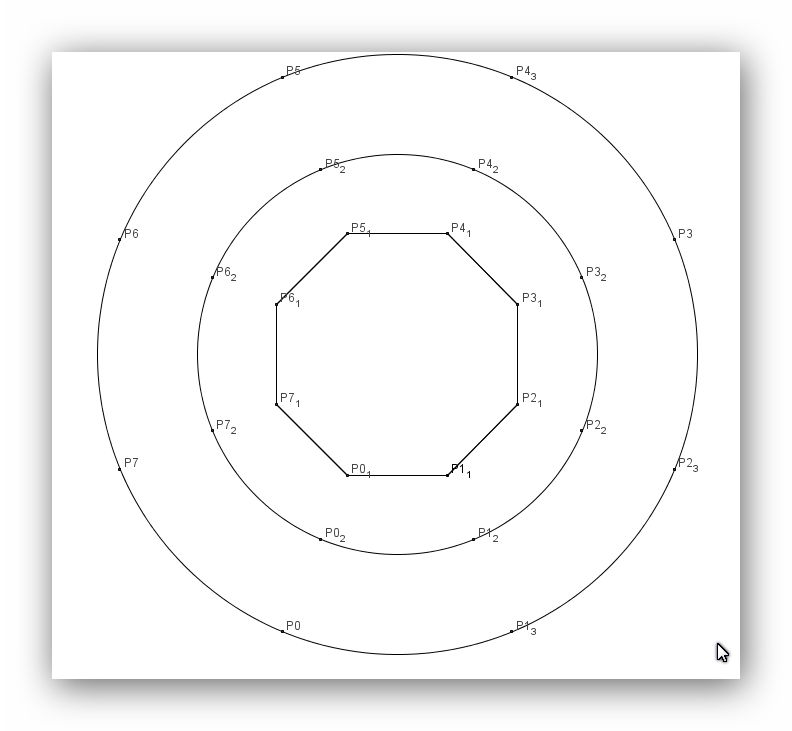
  • at first we construct a regular polygon with 8 corners.  The corner points on it represent the 8 corners of the cube. But the  distance between 2 neighbour points on the polygon is  not always the same.
    • if both points are neighbour corners of the cube, they are connected by an edge with length 1
    • if both points are diagonally opposite corner points of a square, then the distance between them is  1.414 and one of both points must  be on the first circle
    • if both points are diagonally opposite corner points in the cube, then one of them must be on the second circle
  • then we construct a 1. circle, which represents the diagonals of the 6 square faces of the 3 dimensional cube
  • thereafter we construct a 2. larger circle, which represents the space diagonals of  the   3 – dimensional cube
  • On the polygon and on both circles we arrange the 8 points in the same order. Same points are on the same radius from the midpoint to the outer circle.

templateVisualPaths

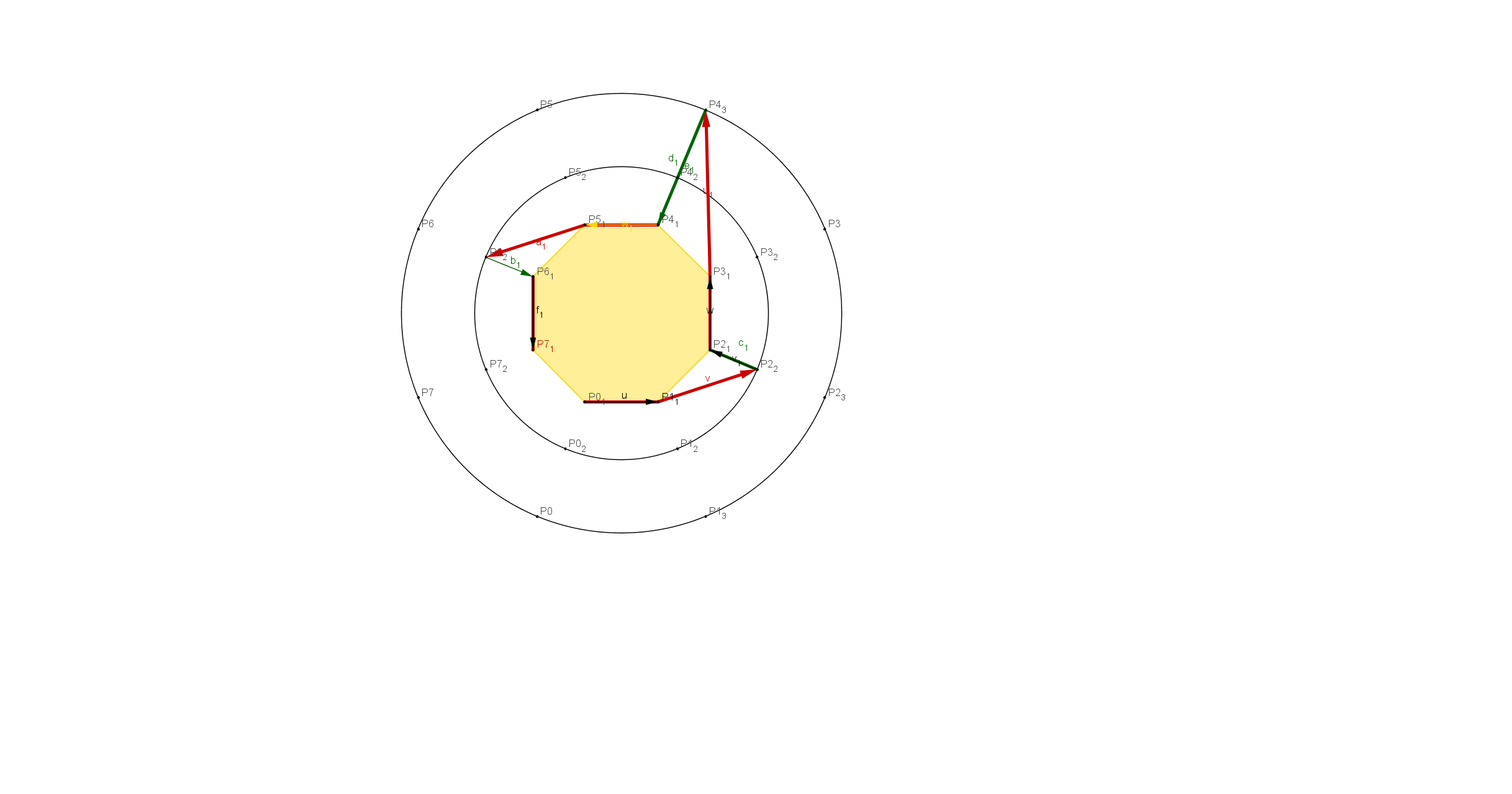
Construction  of the path   P0, P1,P2,P3,P4,P5,P6,P7

  • We start with point  P0, which is on the regular polygon.
    • we use following convention:   All starting points are always on the polygon
  • To go from P0 to P1, we can keep going on the polygon, because this connection is an edge of length 1
  • To go from P1 to P2, we have to use a diagonal in a square ( length 1.414) and therefore we go to P2  on the first circle.
  • before we can go further to point P3, we have at first  to go back to the polygon, because P2  and P3 are connected by an edge of length 1.  We mark this by a green arrow, which has the length zero and therefore it would not matter, when we calculate the length of a path. ( of course, in the graphical representation a length is needed, but in the algebraic calculations we would give all green vectors the length zero )
  • To go from point P3 to P4, we go from the polygon to the outer circle, because we have to use a space diagonal, which has the length 1,73
  • We have again to go back to point P4 on the  polygon, because P4 and P5  are connected by an edge of length 1
  • From P5 to P6 we have to use a square diagonal and therefore we have to go to the first circle
  • P6 and P7 are connected by an edge. Therefore we have at first to go back from the first circle to the polygon and then we can construct the connection between P6 and P7
  • Because we use an open path, we do not  go back to  point P0

Paths3dimCubeVersion8

As usual, one has to use this kind of representation several times, to get familiar with it.

We can derive  following  from this representation:

  • if  two neighbour points in a path are on the polygon, then their distance is 1
  • if one point is on the polygon and its neighbour point on the first circle, then the distance is 1.414
  • if one point is on the polygon and its neighbour point on the second circle, then the distance is 1.73
  • in a path always one neighbour point is on the polygon

With this representation we  get a good overview of the structure of the paths in a cube of any dimension.

  • for a cube of dimension n  we have a polygon with n corner points and n-1 circles of increasing radii around it. On each circle the n corner points are arranged in the same order as on the polygon; all corner points with the same number are on the same radial ray.

To visually represent networks, which have no geometrical meaning, we just can give them a virtual geometric meaning:

  • we construct a regular polygon. Direct neighbour points are connected by edges of length 1
  • points, between which another point is, are on the first circle
  • points, beween which there are 2 points, are on the second circle.
  • etc.

For the radii of the circles we use  suitable lengths, so that we get a nice  representation.

The example with the cubes  helped us, to find a good visual representation for paths in abstract information networks.

Of course, if there are many points in a network, then we can do all the work only with the help of computer programs. But now we know, what we have to program and we have examples, with which we can test the programs.

One further remark:

I prepared the drawings with GeoGebra, which is very good for it. One cannot create top quality pictures with it, which one could use for publications, but it is an excellent tool, to investigate geometrical problems.

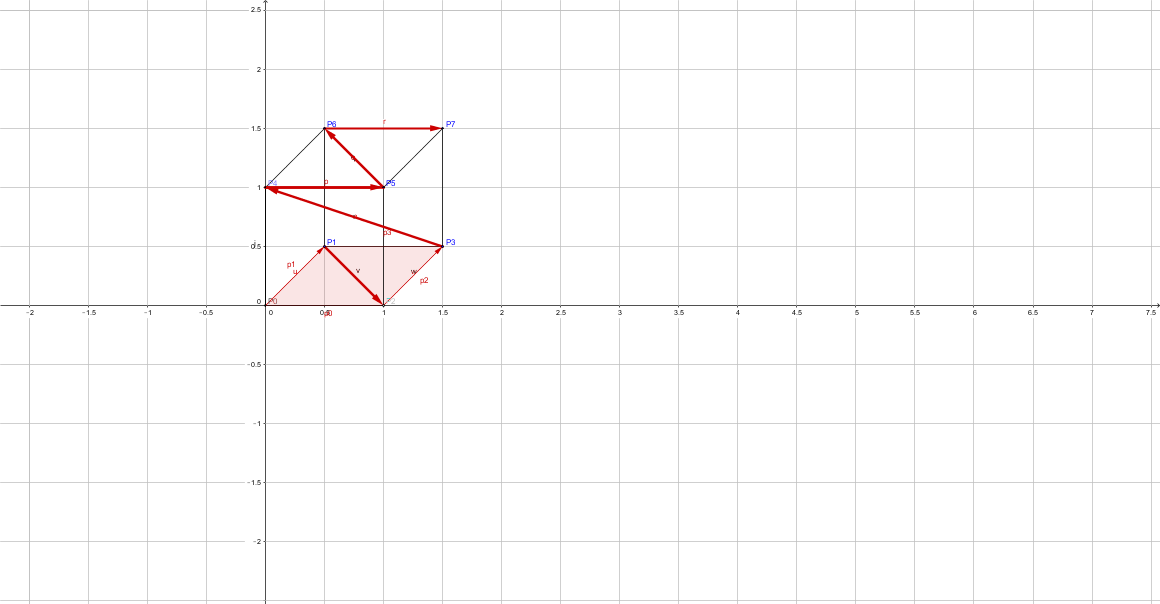
And here is finally  the 3 dimensional cube with the path. I think, that even with a 3 dimensional cube, the  abstract representation is better, because one sees directly all characteristics of a path.

Paths3dimCubeVersion8 3dimCubeVersion2

Veröffentlicht unter information networks | Verschlagwortet mit | Hinterlasse einen Kommentar

onine-Kurse: mit Babbel Fremdsprachen lernen

Es gibt sehr viele ausgezeichnete  online  Kurse; viele sind kostenlos oder bitten um eine Spende, andere sind kostenpflichtig.

Mit Babbel können zur Zeit 13 Fremdsprachen online gelernt werden. Dafür werden alle modernen  Sprachlernmethoden angewendet, wie:

  • Text und Bilder
  • Sprache in beiden Richtungen lernen
  • Multi-Choice Methoden
  • Vokabellernen nach der Leitner-Methode
  • Dialoge,die von Muttersprachlern gespochen werden
  • Das Hören und das Schreiben wird trainiert
  • Aussprache wird mit Spracherkennungssoftware kontrolliert

Wenn man den inneren Schweinehund überwindet und nach Möglichkeit jeden Tag mit Babbel eine Sprache trainiert  ( empfohlen werden 10 bis 15 Minuten ) kann man jede der angebotenen Sprache in ca. 1 bis 2  Jahren  so gut beherrschen, daß man in ihr mündlich und schriftlich gut kommunizieren kann.

  • Babbel hat seit 2011 immer wieder Auszeichnungen erhalten.
  • Babbel kann am Computer, mit dem Smartphone oder einem Tabletcomputer gelernt werden.
  • Das Lernen einer Sprache kostet für 1 Jahr  60 euro. Wieviele Lektionen man während dieser Zeit lernt, spielt keine Rolle. Für mehrere Sprachen gibt es Sonderangebote.

Da das Lernen einer Fremsprache mit eines  der besten Gehirntrainingsmethoden ist, sollte es jeder nutzen. Außerdem macht es Spaß.

Übrigens:  Es ist möglich, damit auch mehrere Fremdsprachen parallel zu lernen.

  • eine Fremdsprache, die man bereits relativ gut beherrscht zum Beispiel jeden Tag 5 Minuten trainieren
  • eine neue Fremdsprache jeden Tag 15 Minuten trainieren
  • andere Fremdsprachen einfach mal aus Neugierde einige Tage trainieren, um einen ersten Eindruck davon zu bekommen.
Veröffentlicht unter Uncategorized | Verschlagwortet mit , | 1 Kommentar